



Organize Your Living Room with a Mid-Century TV Stand
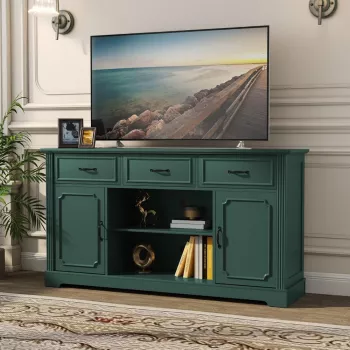
A comfortable living room needs a place for the TV, but it also needs room for the things you reach for every day. Our Mid Century TV Stand for 65 Inch TV with Drawers & Shelves brings those needs together with storage and mid-century-inspired style.
Whether you are setting up a new space or giving your current entertainment area a more organized feel, start with the essentials: a stable spot for the screen, accessible storage for accessories, and enough space around your equipment to use it comfortably.
Make Room for Your Entertainment Setup
This stand is intended for a TV up to 65 inches, but screen size alone does not tell you whether your setup will fit. A TV’s advertised size is measured diagonally, while the space it occupies depends on its actual width and the position of its base or feet. Measure both before deciding where to place it.
Next, measure the available floor space. Consider not only the width of the area but also how far the stand will project into the room. Leave enough clearance for walkways and for opening drawers comfortably. Compare your measurements with the product dimensions, and check the weight capacity against the weight of your TV and anything else you plan to place on the stand.
A dedicated TV stand can give your entertainment area a clear place in the room. Instead of letting equipment and accessories spread across side tables or the floor, you can gather them in one location and arrange seating around a defined focal point.
Give Everyday Items a Place
Drawers are useful for the smaller objects that tend to disappear between couch cushions. Keep remotes, game accessories, and other frequently used items together so you can find them without searching the room. Small containers or dividers can help keep similar items grouped.
Use the shelves for suitably sized media equipment or items you want within easy reach. Before placing electronics inside, measure each device and follow its manufacturer’s ventilation recommendations. Equipment may need clearance around its sides, top, or back to operate safely.
The top can hold the TV and a few decorative accents, provided the screen has a stable position. Use this simple plan to decide what stays visible and what gets put away:
| Area | Suggested use | Planning tip |
|---|---|---|
| Drawers | Remotes and small accessories | Group small items so they are easy to find. |
| Shelves | Media equipment and frequently used items | Check fit and allow ventilation recommended by the equipment manufacturer. |
| Top | TV and a few decorative accents | Check the TV footprint and keep the screen stable. |
As you organize, consider how often you use each item. A remote you reach for every evening deserves a convenient spot, while occasional accessories can go farther back in a drawer. Keeping the arrangement simple also makes it easier to return everything to its place.
Bring Mid-Century Style Into the Room
The stand can serve as a mid-century-inspired focal point alongside a comfortable sofa and a simple rug. You do not need to make every piece match: a balanced arrangement can bring together furniture you already own while giving the TV area a more intentional look.
Try placing one or two modest accents beside the screen rather than filling every open surface. A small framed print or a decorative object can add personality without competing with the TV. Keep accessories clear of the screen, its base, and any ventilation openings.
Think about the room beyond the stand, too. If you share your living room with a cat, you might set up a separate activity area away from the entertainment equipment. Our Cute Cat House with Rotating Turntable Toy is another option to explore when planning that space. Allow enough room for people to move comfortably between the two areas.
Plan a Secure Setup
Follow the product’s assembly and placement instructions, along with the safety guidance from both the TV and furniture manufacturers. Place the stand on a suitable, stable surface, and make sure the TV base sits securely on top. Avoid arranging accessories where they could interfere with the screen’s stability.
Securing the TV and furniture against tip-overs is an important consideration, especially in homes with children. Choose appropriate restraints and follow their installation instructions where recommended. For practical prevention guidance, visit the U.S. Consumer Product Safety Commission’s Anchor It! resource.
Ready to bring your setup together? View our Mid Century TV Stand for 65 Inch TV with Drawers & Shelves, listed at $355.01. Pricing and availability may change.
FAQ
Will this stand fit a 65-inch TV?
The stand is intended for a TV up to 65 inches. Before purchasing, compare your TV’s actual width and base footprint with the stand’s dimensions, and check the weight capacity.
What can I store in the drawers and shelves?
Drawers can hold remotes and small accessories, while shelves can accommodate suitably sized media equipment or frequently used items. Check each device’s dimensions and ventilation requirements before placing it on a shelf.
How should I make the TV setup safer?
Follow the TV and furniture manufacturers’ assembly, placement, and safety instructions, and consider appropriate tip-over restraints. The CPSC Anchor It! guidance offers additional information on preventing tip-overs.













Leave a comment