


2K Smart Home Security Camera: Placement and Setup
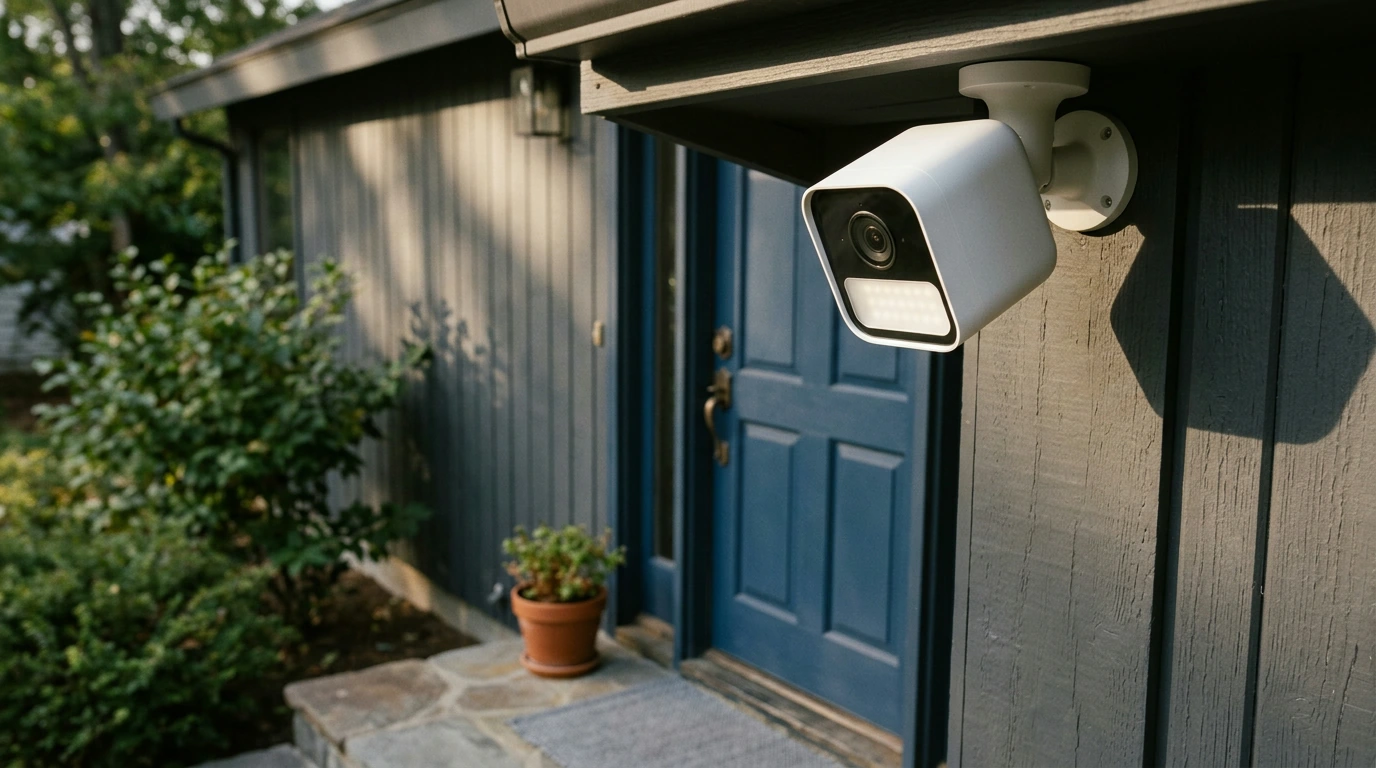
A clear view of a chosen area can make everyday home monitoring more convenient. Our 2K HD security camera combines a high-resolution view with a motion spotlight and voice assistant integration, giving you several ways to build a setup around your needs.
The camera is only one part of a useful setup, though. Where you place it, how the light affects its surroundings, and who can access the account all matter. Our team recommends starting with the area you want to monitor and working backward from there.
What the Camera Brings to Your Home
Each of the camera’s main features serves a different purpose. The 2K HD resolution provides a high-resolution view of the monitored area, while the motion spotlight is designed to respond to movement. Voice assistant integration adds an option for connecting the camera to a compatible smart home setup.
Our 2K HD Smart Home Security Camera with Motion Spotlight and Voice Assistant Integration is $45.97. Visit the product page for current availability and details before choosing your setup.
Features at a Glance
| Feature | What It Offers |
|---|---|
| 2K HD resolution | A high-resolution view of the monitored area |
| Motion spotlight | A light designed to respond to motion |
| Voice assistant integration | A way to connect the camera with a compatible voice assistant |
Choose a Useful Camera Location
Start by identifying the specific space you want to keep an eye on, such as an entryway or another frequently used area. A clear view of that space is more useful than a broad view interrupted by walls, plants, furniture, or other obstructions. Consider how the area changes during the day, too: a door that is often left open or a seasonal plant may block part of the view.
Look at existing lighting and where the camera’s spotlight would shine. Think about privacy for your household, visitors, and neighbors, and avoid aiming the camera into areas where others reasonably expect privacy. Positioning it with a deliberate, limited view can help you focus on the space that matters to you.
Before mounting, read the product instructions and confirm that your chosen location provides access to the connections the camera requires. Check the installation requirements and use an appropriate mounting surface. Planning those details first can save you from repositioning the camera later.
Make the Most of Motion Lighting
A spotlight that responds to movement can add light around the monitored area when activity occurs. That can be useful in a space that is dim at certain times, particularly where you want illumination to accompany the camera’s view.
Consider the direction of the light as carefully as the direction of the camera. A spotlight aimed toward a neighbor’s window or a frequently used walkway could be disruptive. If possible, choose a position that directs the light toward your intended area rather than across a property line.
Nearby porch lights and other fixtures may also affect how useful the spotlight is in that location. Walk through the area at different times of day to see where existing light falls and where shadows may appear. We recommend following the product instructions when positioning and using the camera rather than assuming a particular detection range or set of lighting controls.
Connect It to a Smart Home Routine
Voice assistant integration can be a convenient addition if you already use a connected home system. It gives you an option to incorporate the camera into a compatible setup rather than managing every device separately.
Before purchasing, confirm that your voice assistant is supported and review any setup requirements. Compatibility can depend on the devices and services you use, so it is worth checking how the camera will fit into your existing arrangement. Follow the manufacturer’s instructions to connect the device, and review the permissions requested during setup.
As you organize a home routine, keep everyday items accessible without letting them obstruct the camera’s view. For a separate countertop update, our 500ml Glass Soap Dispenser Bottle offers a place for liquid soap.
Keep Camera Access Secure
A connected camera deserves the same attention to account security as other devices on your home network. Create a strong, unique password for the associated account, and enable multifactor authentication if it is available. Avoid sharing sign-in details when a separate access option is offered.
Keep the camera and its associated app updated, and periodically review who has access. Remove permissions that are no longer needed, such as access granted to someone who no longer helps manage your home. Secure your Wi-Fi network as well; the Federal Trade Commission’s home Wi-Fi guidance explains practical steps for protecting it.
For more connected-device habits, see CISA’s guidance on securing the Internet of Things. A few routine checks can help you maintain a setup that remains useful and appropriately restricted to the people you choose.
FAQ
What does 2K HD mean for a security camera?
2K describes the camera’s resolution and can provide a high-resolution view of the area it monitors.
Does the spotlight respond to motion?
Yes. The camera is described as having a motion spotlight designed to respond to movement.
Which voice assistants work with the camera?
The camera supports voice assistant integration, but you should confirm compatibility with your assistant and review setup requirements before purchase.













Leave a comment