



Pop-Up Desktop Power Socket: Aluminum Alloy + USB
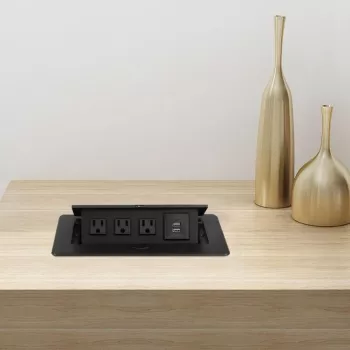
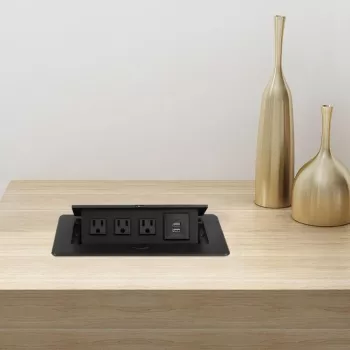
Aluminum Alloy Desktop Pop-Up Power Socket with USB Ports
A clean desk is easier to work on—and safer to power. Our aluminum alloy desktop pop-up power socket is designed to sit flush in a tabletop, then rise when it’s time to plug in laptops, monitors, chargers, and USB-powered devices. You get power where you actually use it, without leaving cords sprawled across the surface. It’s a practical upgrade for home offices, shared workstations, conference tables, and study desks where convenience and cable discipline matter.
What a pop-up desktop power socket changes on a workspace
Most desk power problems aren’t about having “enough outlets”—they’re about where those outlets live. A pop-up module shifts power from the wall to the work surface, so your setup stays functional even when your desk isn’t parked against an outlet.
- Power where it’s needed: outlets and USB ports come up to the desktop instead of forcing devices to reach a wall socket.
- Less visual clutter: cables route down through the desk opening, helping the surface stay clear for notebooks, keyboards, and documents.
- Space-efficient access: ideal for desks placed away from walls, corner setups, and meeting tables where multiple people need convenient charging.
- Cleaner shutdown: when devices are unplugged, the unit can be pushed down to keep the desktop profile neat.
Why aluminum alloy makes sense for everyday use
Your desktop is a high-contact zone: hands, mugs, cables, and adapters all bump into whatever sits on the surface. An aluminum alloy top plate helps the power point feel like part of the desk rather than a temporary add-on.
- Durable top surface: aluminum alloy resists day-to-day scuffs better than many painted plastic finishes commonly used on desktop accessories.
- Professional look: a metal top blends naturally with modern office furniture, standing desks, and conference-room tables.
- Easy to maintain: wipe with a soft, slightly damp cloth; avoid abrasive pads that can dull the finish.
- Stable feel: a solid top plate helps the socket feel secure during frequent plug/unplug cycles.
Where it fits best: desks, counters, and conference tables
If you’ve ever routed a power strip up onto a desk “temporarily” and then lived with it for months, you already know the value of built-in access. A pop-up socket is especially useful when your workspace has multiple devices that need predictable power locations.
- Home office desks: keep a laptop charger, monitor power, and phone charging within reach without a floor power strip.
- Conference and meeting tables: provide accessible charging for guests without passing extension cords across the table.
- Reception counters and studios: create a tidy charging spot for card readers, tablets, task lights, or accessory chargers.
- Shared workstations: add a dedicated power point per seat to reduce outlet-hunting and cable tangles.
Placement ideas and what they solve
| Placement spot | Best for | Practical benefit |
|---|---|---|
| Back corner of a desk | Monitors, laptop dock, task lighting | Keeps thicker power cords out of the main work area |
| Center-rear of a long table | Meetings and group work | Lets multiple people charge without crowding one wall outlet |
| Near a monitor arm/grommet area | PC setups, docks, peripherals | Pairs well with cable management channels under the desk |
| Side edge of a workstation | Frequent phone charging | Quick access without reaching over keyboards or papers |
USB ports: convenient charging without extra adapters
USB charging on the desk is one of those small changes that improves daily rhythm: you sit down, plug in, and move on. It also helps keep bulky adapters from crowding your AC outlets—especially useful when you have laptop bricks, monitor plugs, or other larger power supplies.
- Quick daily charging: USB ports reduce the need for bulky wall adapters when topping up phones, earbuds, and accessories.
- More room for larger plugs: using USB for small devices can free up AC outlets for laptop bricks and monitor power supplies.
- Better charging habits: a dedicated, always-within-reach port makes it easier to keep devices charged during work sessions.
- Compatibility note: charging speed depends on the device and cable; use quality cables and avoid damaged connectors.
If you’d like to understand how USB standards and compliance work at a high level, the USB Implementers Forum (USB-IF) is a solid reference for terminology and spec basics.
Installation planning: measure once, cut once
Safe, sensible everyday use
For general electrical safety context, ESFI’s safety guidance and UL’s certification and standards information are both helpful, especially when you’re organizing power for multiple devices.
Pick from our in-stock essentials
- Aluminum Alloy Desktop Pop-Up Power Socket with USB Ports
- 500ml Glass Soap Dispenser Bottle
- Diadora Men’s Sneakers
FAQ
Will this pop-up socket fit my desk thickness and layout?
Measure your desktop thickness and confirm there’s enough open space underneath for the socket body plus a comfortable cable bend (especially if you use large “brick” adapters). Before cutting, check for anything that could collide with the housing—cross-braces, drawers, keyboard trays, and standing-desk frames are the most common surprises.
Do the USB ports charge phones and tablets effectively?
Yes—USB ports are intended for everyday charging of common devices like phones, tablets, earbuds, and accessories. Real-world speed depends on your device, charging protocol, and cable quality, so a good cable often makes a noticeable difference.
Is it safe to use for laptops, monitors, and desk equipment?
It can be safe when you keep the total load within the socket’s rating and the capacity of the circuit you’re plugging into. Avoid daisy-chaining multiple power strips, keep connections dry and unobstructed, and don’t use damaged cords or loose plugs.
















Leave a comment